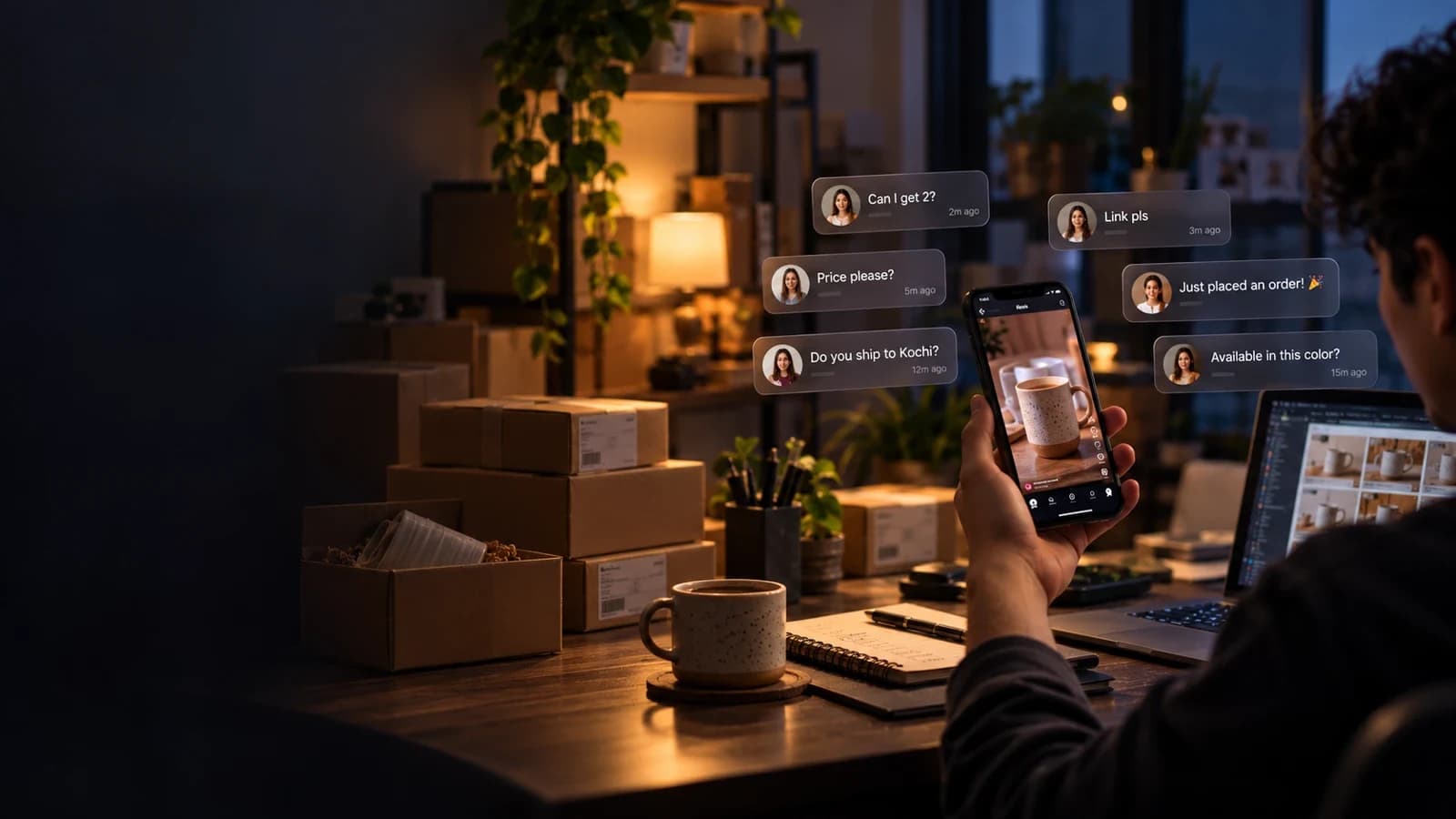
Most people hear "Instagram DM automation" and picture one thing: a bot that replies "thanks!" to comments. That's the floor, not the business.
The creators and brands who actually make money from Instagram treat DMs like a small sales funnel. Different triggers, different offers, different follow-ups — and still human enough that people feel answered, not processed.
Below are 10 types of Instagram DM automation, each mapped to a real outcome (leads, followers, bookings, sales), with the exact way to set it up in LinktoDM.
- Start with comment-to-DM. It's the automation that fires on questions people are already asking.
- Add Ask to Follow if follower growth matters, and email capture if you want leads you own.
- Move to Flow Builder once a single DM converts and you need branches, delays or payments.
- Use Backtrack to answer eligible comments from the last 7 days that you missed.
What Is Instagram DM Automation?
Instagram DM automation is software that sends direct messages for you when someone does something specific — comments on a reel, replies to your story, mentions you, or messages you a keyword. Done properly, it runs on Meta's official Instagram API, so you never hand over your password and every message stays inside Instagram's rules.
The difference between automation that "replies" and automation that "grows revenue" is simple: the second kind is built around what happens after the first message.
How to Use This List
Every automation type below answers four questions:
- What it is — the trigger and the action.
- Who it's for — the kind of account that gets the most from it.
- Outcome — what it actually moves.
- How to set it up in LinktoDM — the steps, with links to the docs.
You don't need all ten. Pick the one closest to a question your audience already asks you manually, ship it, and layer the rest on later.
1. Comment-to-DM Automation
What it is: Someone comments on your post or reel, and they automatically get a public reply under their comment and a private DM with whatever they asked for.
Who it's for: Any creator, coach or D2C brand whose comment section is full of "link?", "price?" and "details pls".
Outcome: Instant answers, more link clicks, and fewer buyers lost when a reel takes off faster than you can reply.
How to set it up in LinktoDM
- Connect your Instagram account through Meta's official login.
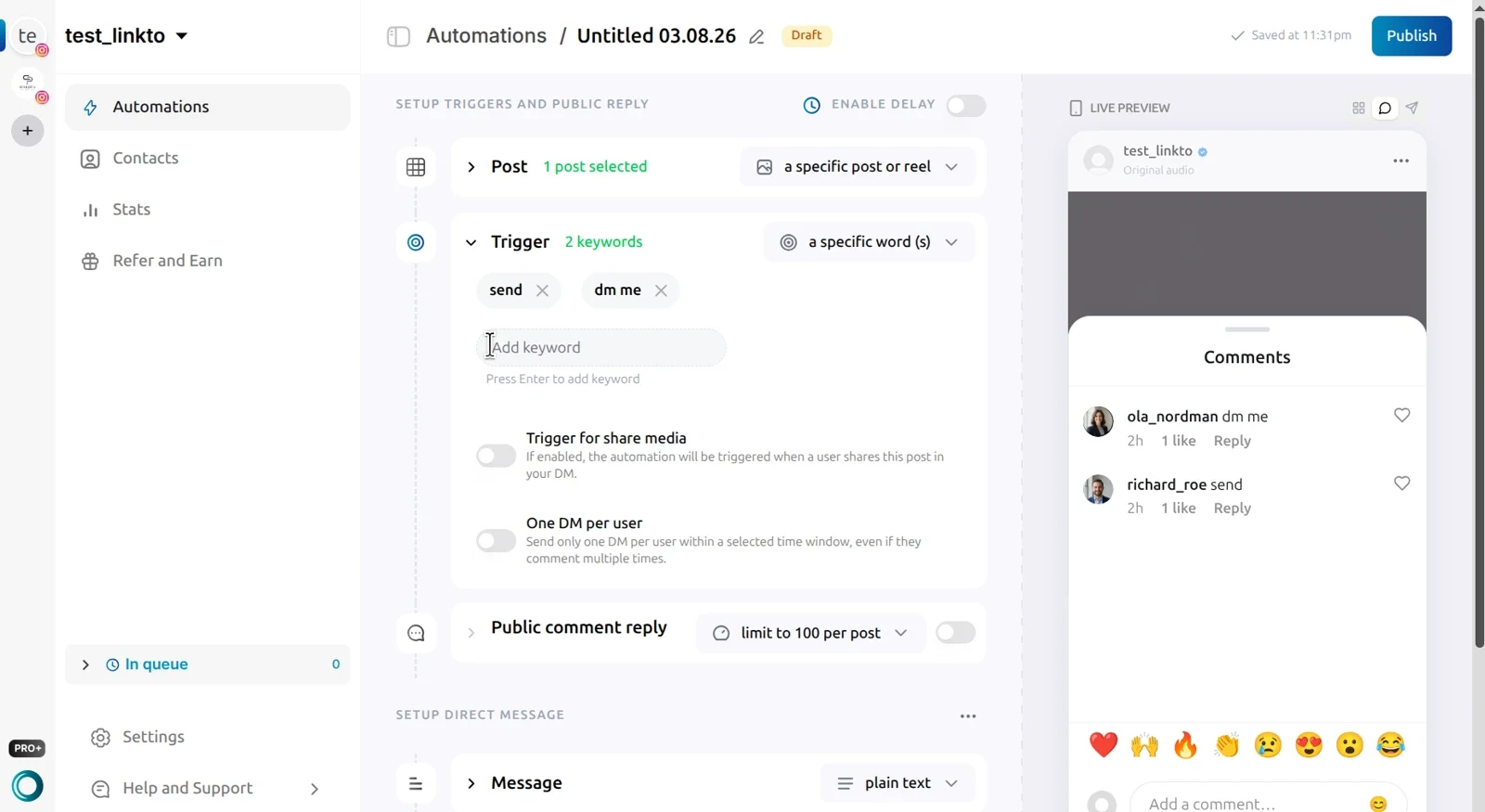
- Create a post automation and choose which post it watches: a specific post, your next post, or all posts and reels.
- Pick a trigger: any word, specific keywords (LINK, PRICE), or Intent Match, which matches on meaning — so "how much?", "cost?" and "price pls" all fire the same DM.
- Write your public reply and your DM, with message variations so it never reads copy-pasted.
- Publish and test it from a second account.
New to this? Our step-by-step guide to setting up auto DM on Instagram walks through it end to end. Moving from another tool? See how LinktoDM compares on the ManyChat alternative page.
2. Story Reply Automation
What it is: When someone replies to or reacts to your Instagram Story, they automatically get a DM back.
Who it's for: Educators, coaches and brands who use Stories for polls, "reply YES for the link", limited drops or daily tips.
Outcome: Turns 24-hour Story attention into a saved conversation with a clear next step.
How to set it up in LinktoDM
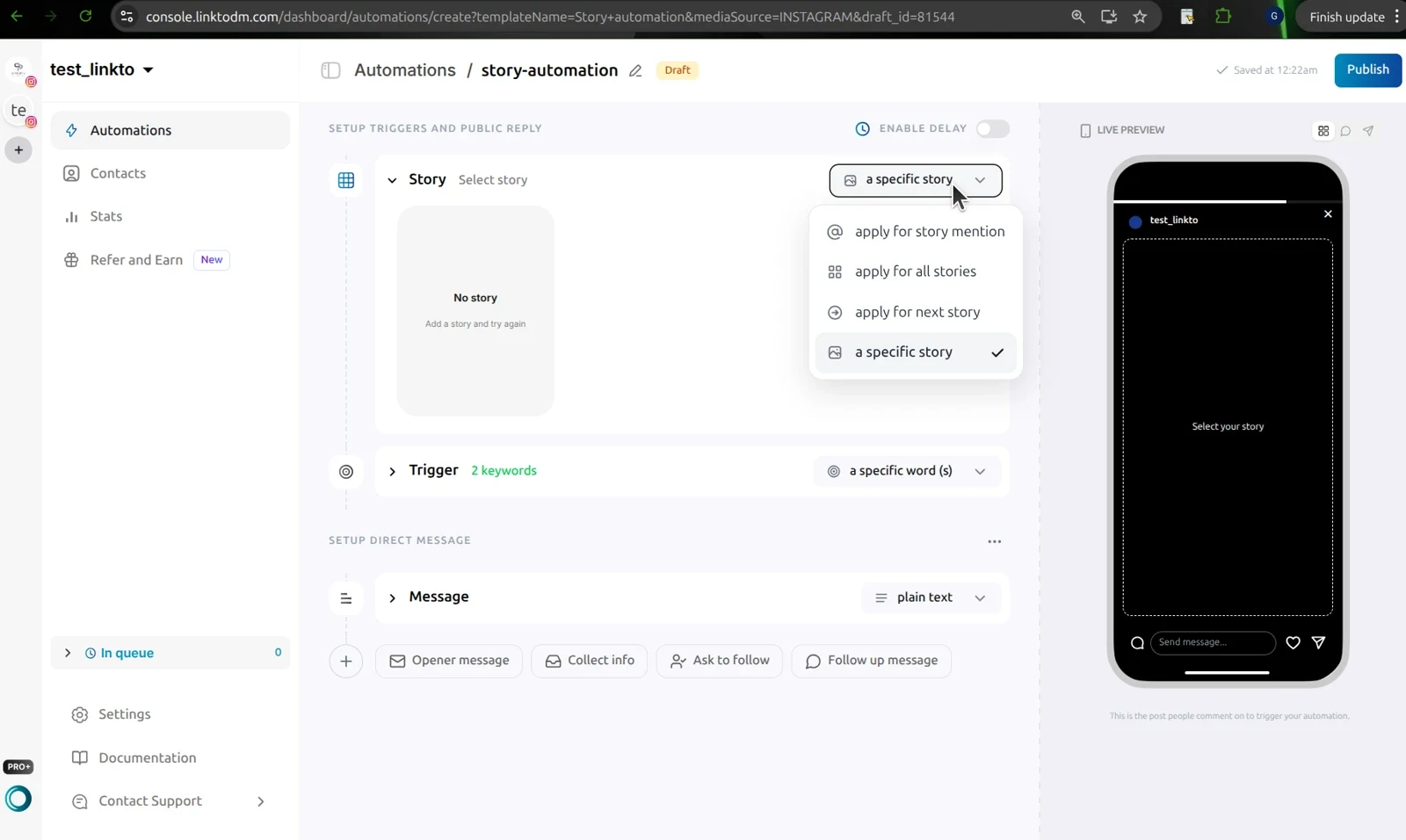
- Click + New automation and choose Story automation.
- Pick what it watches: all stories, your next story, or a specific story that's live right now.
- Set the trigger to any word (catches emoji reactions too), specific keywords, or Intent Match.
- Switch on One DM per user — Stories invite rapid-fire replies, and nobody wants five identical DMs.
- Keep the DM short with one CTA. Story traffic expects speed.
Tip: a specific story expires after 24 hours, and so does its automation. Use all stories or next story for anything meant to keep running.
3. Story Mention Automation
What it is: When someone tags your account in their Story, LinktoDM replies automatically so the mention doesn't sit unread in your requests.
Who it's for: Brands with UGC, restaurants and cafés, affiliate creators, and anyone running "tag us to get X" campaigns.
Outcome: A fast thank-you, happier customers, and fewer missed partnership or UGC leads.
How to set it up in LinktoDM
- Create a Story automation and choose apply for story mention. The mention is the trigger, so there's no keyword to set.
- Write a genuine thank-you DM — add a discount code or reshare promise if that's your campaign.
- Add a next step if you want one: Ask to Follow, or a question like "Want the collab form?"
4. Keyword DM (Chat) Automation
What it is: Someone messages your inbox a keyword — PRICE, BOOK, SUPPORT — and instantly gets the right reply, without you digging through requests.
Who it's for: Businesses with repeat questions, creators selling more than one offer, and anyone with a "DM me the word X" CTA in their bio.
Outcome: Faster FAQs, cleaner inbox triage, and a working CTA in your bio, captions and end-of-reel slides.
How to set it up in LinktoDM
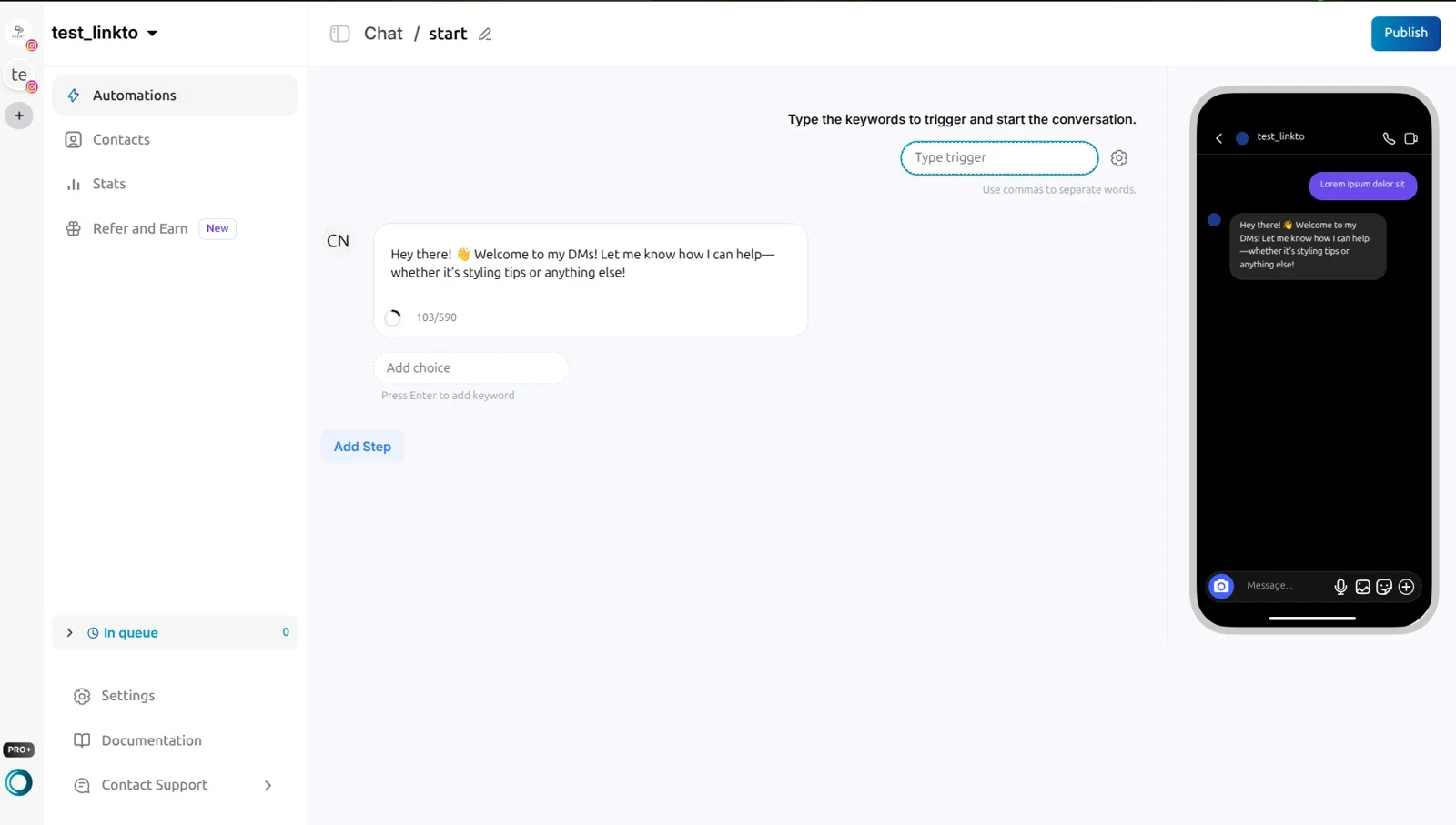
- Create a chat automation and add the keyword(s) that start it.
- Keep keywords distinct — overlapping words collide.
- Write the reply as a short script of steps, and add choices (buttons) so each option gets its own branch.
- Tell people the word: put "DM me BOOK" in your bio, a Story sticker, or a caption.
Read how chat automation works to see where it fits next to post and story automations.
5. Ask to Follow (Follow Gate)
What it is: Before the resource is delivered — a link, PDF or discount — the automation asks the person to follow you, checks that they actually did, and then sends it.
Who it's for: Growth-focused creators, lead magnets, giveaways and product launches, where every follower compounds future reach.
Outcome: Followers who already wanted what you offer — without begging for follows in every caption.
How to set it up in LinktoDM
- Start from a post, story or flow automation.
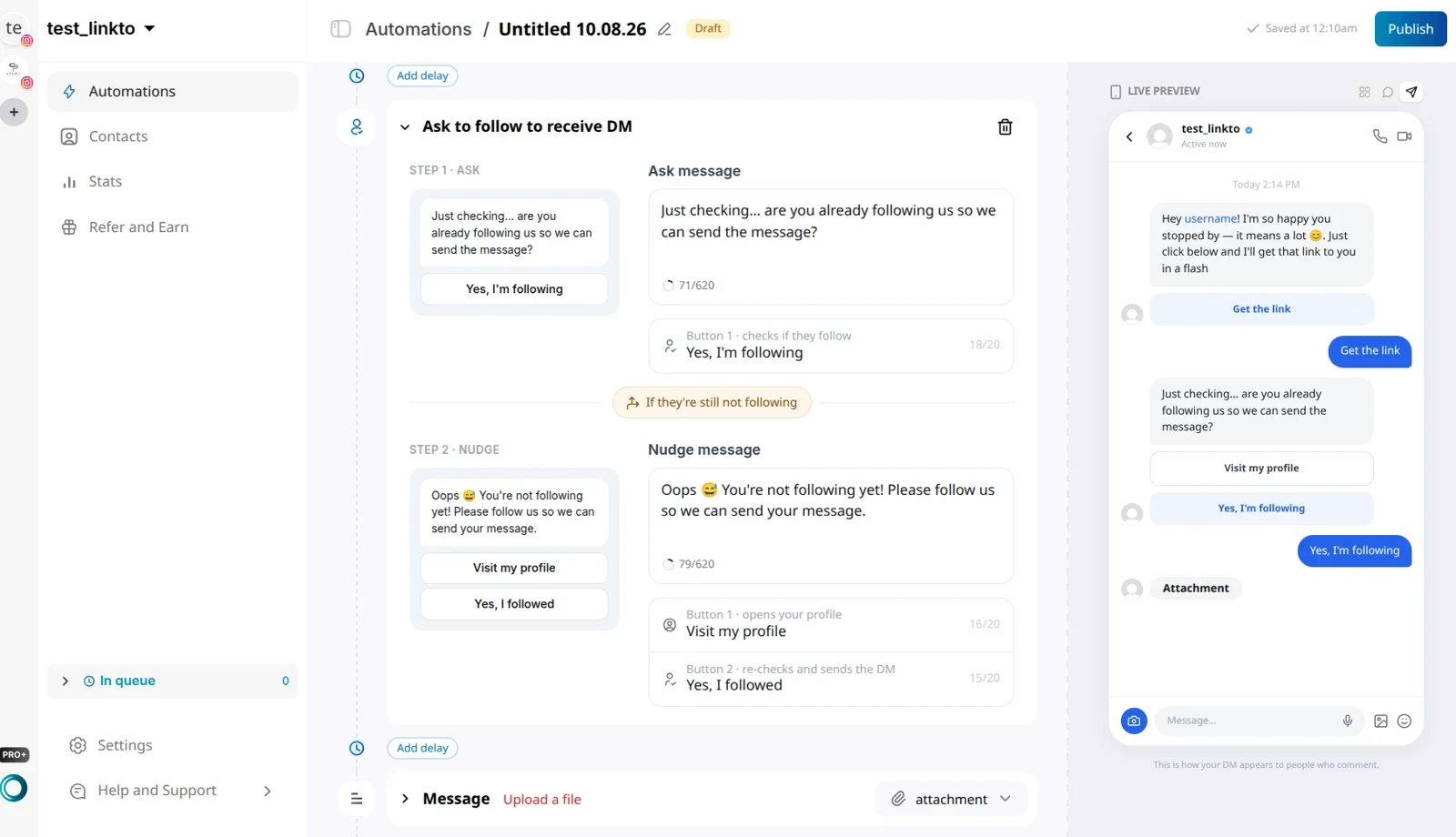
- Add Ask to follow to receive DM from the step buttons under the DM section.
- Step 1 · Ask sends a "Yes, I'm following" button. LinktoDM really checks — tapping it without following doesn't unlock the DM.
- Step 2 · Nudge runs if the check fails, with a Visit my profile button and a re-check.
- Keep the ask light and honest. The caption should match what they actually receive.
6. Email and Phone Capture in DMs
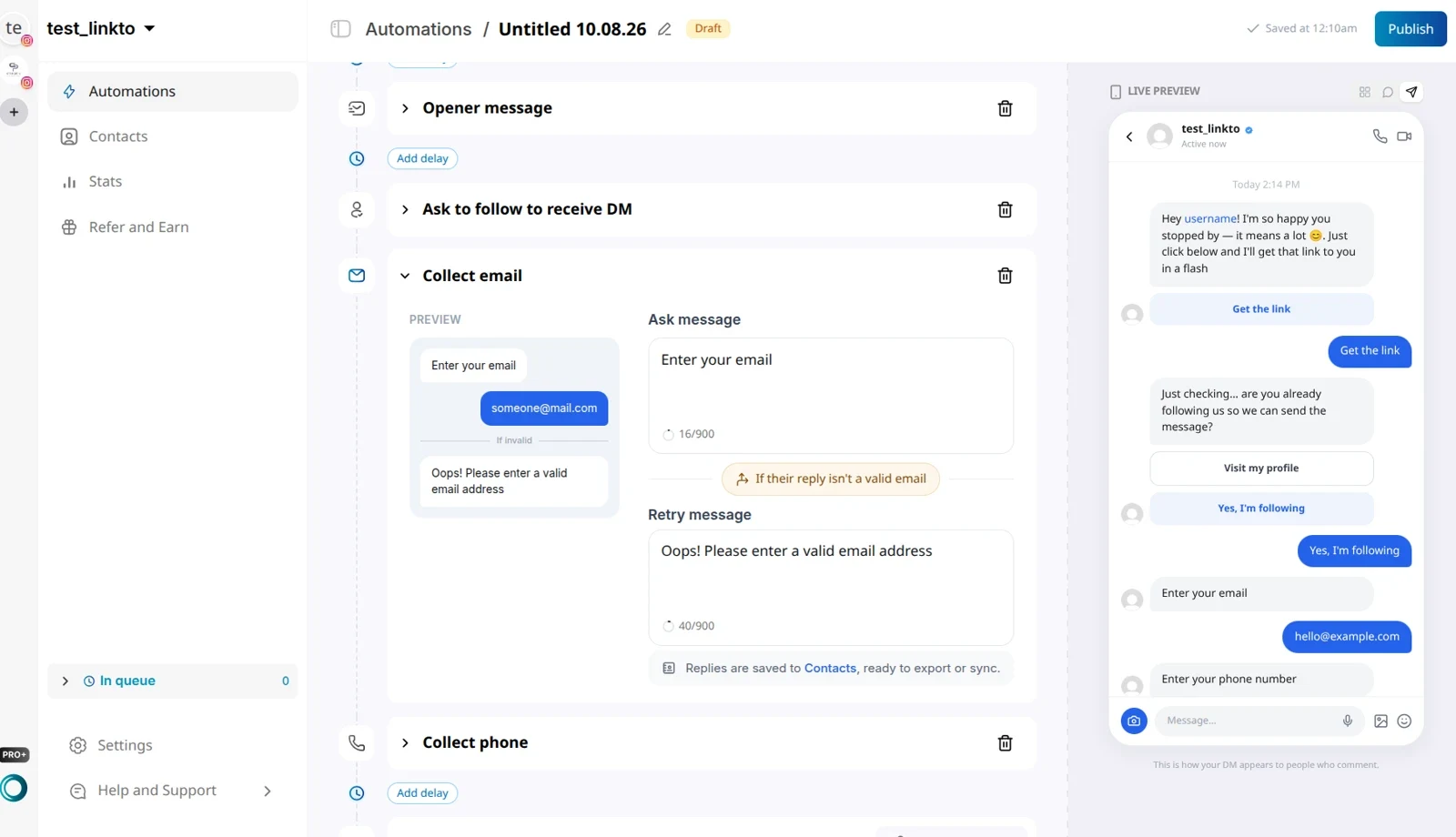
What it is: The DM asks for an email address or phone number, validates the reply, and saves it to your Contacts.
Who it's for: Course creators, coaches, webinar hosts and brands building an audience they own — not one they rent from the algorithm.
Outcome: Leads you can still reach when reach drops, and a list you can nurture by email or SMS.
How to set it up in LinktoDM
- Trigger from a comment keyword, Story reply or chat keyword (MAIL, JOIN, NOTIFY).
- Add Collect email or Collect phone from Collect info.
- Write a retry message — a typo gets asked again instead of losing the lead.
- Give first, ask second: deliver something (or at least an opener) before asking.
- Export contacts, or sync them to your email or CRM tool with Zapier.
Always say what the email is for. "Where should I send the guide?" works better than "Enter your email" — and it's honest.
7. Boosted Post Comment Automation
What it is: Comment-to-DM on a post or reel you're boosting, where comment volume spikes with ad spend.
Who it's for: D2C brands, coaches and performance marketers putting budget behind Instagram content.
Outcome: Paid comments answered in seconds, and a lower cost per lead when the DM delivers exactly what the ad promised.
How to set it up in LinktoDM
- Make sure a normal comment-to-DM automation works on the account first.
- Attach a post automation to the specific post or reel you're boosting.
- Use Intent Match or tight keywords, plus public reply and DM variations.
- Keep qualification short — paid traffic is expensive, so get to the offer fast.
- Let Smart Queue Control handle spikes. It slows delivery when Instagram's rate limits kick in and picks the pace back up after.
8. Backtrack: Catch Missed Comments From the Last 7 Days
What it is: A published automation normally only sees comments that arrive after you switch it on. Backtrack runs it back over eligible comments already on the post — up to 7 days old — and replies to the ones that match.
Who it's for: Anyone who went viral while offline, switched tools mid-week, or set keywords too strict during a launch.
Outcome: Recovers leads that would otherwise be buried under newer comments — without making a second reel.
How to set it up in LinktoDM
- Fix the live automation first, so new comments stop slipping through.
- Use Intent Match so only relevant comments get a reply — compliments and emojis are skipped.
- Open Automations, click the ··· menu next to the automation, choose Backtrack comments, then Backtrack Now.
- Run it once per post. Backtracked replies count toward your limits like any other reply.
We wrote a whole piece on this: Don't make another reel — automate the Instagram comments you missed. Full steps are in the Backtrack docs.
9. AI Public Comment Replies
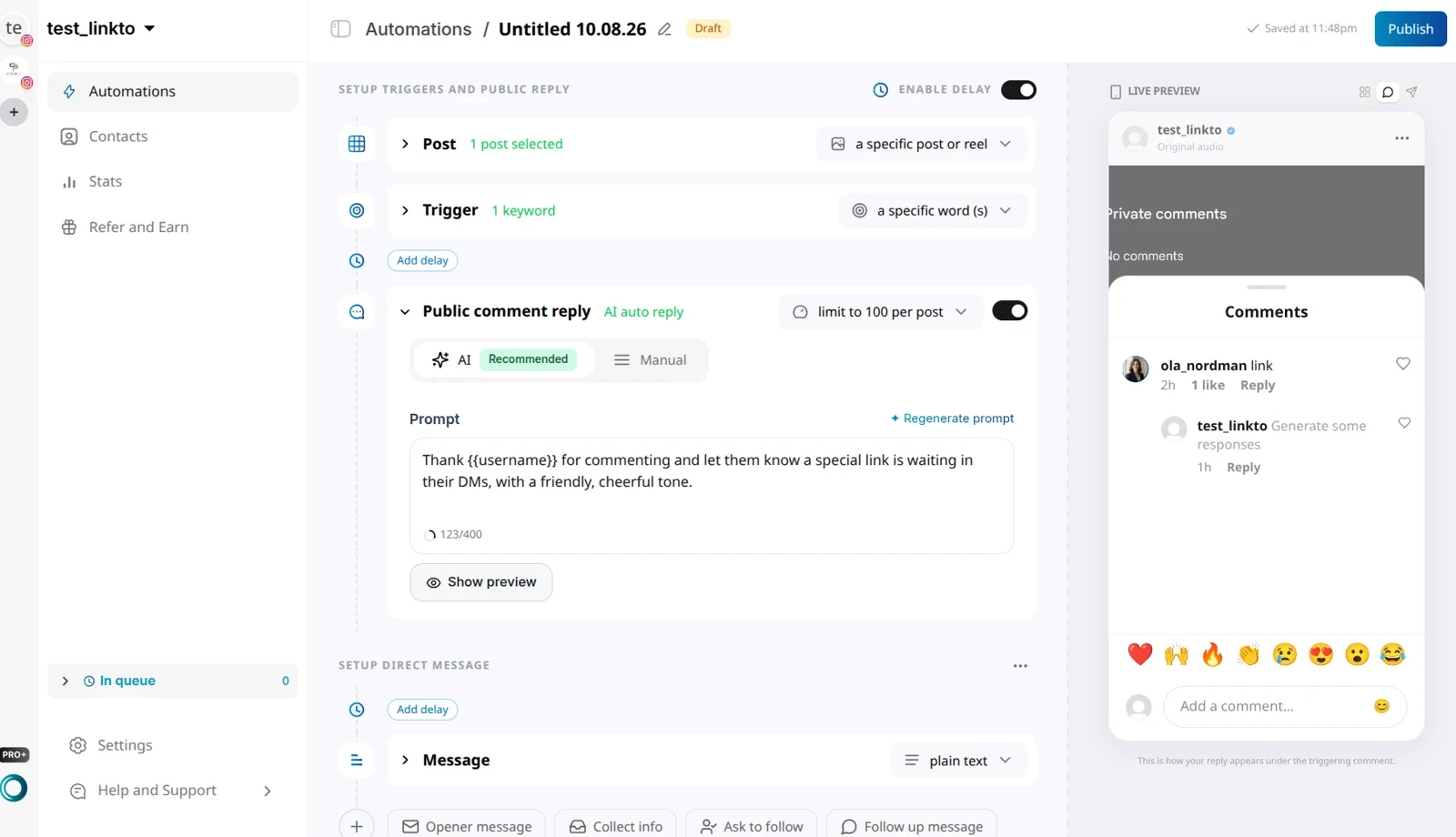
What it is: Instead of one fixed public reply, AI writes a fresh reply to each comment — using the commenter's username — while your DM still carries the link.
Who it's for: High-volume accounts where fifty identical "Check your DMs!" replies make the comment section look like a bot farm.
Outcome: Better social proof on the thread, and a comment section that looks answered by a person.
How to set it up in LinktoDM
- In the Public comment reply card, switch it on and pick the AI tab.
- Write a prompt, not a reply: the job, the tone, and
{{username}}where you want the handle. - Pair it with DM variations so both halves feel human.
- Spot-check replies in sensitive niches like finance or health.
If public replies stop showing up, here's why Instagram auto public comment reply isn't working and how to fix it.
10. Multi-Step Flow Builder Journeys
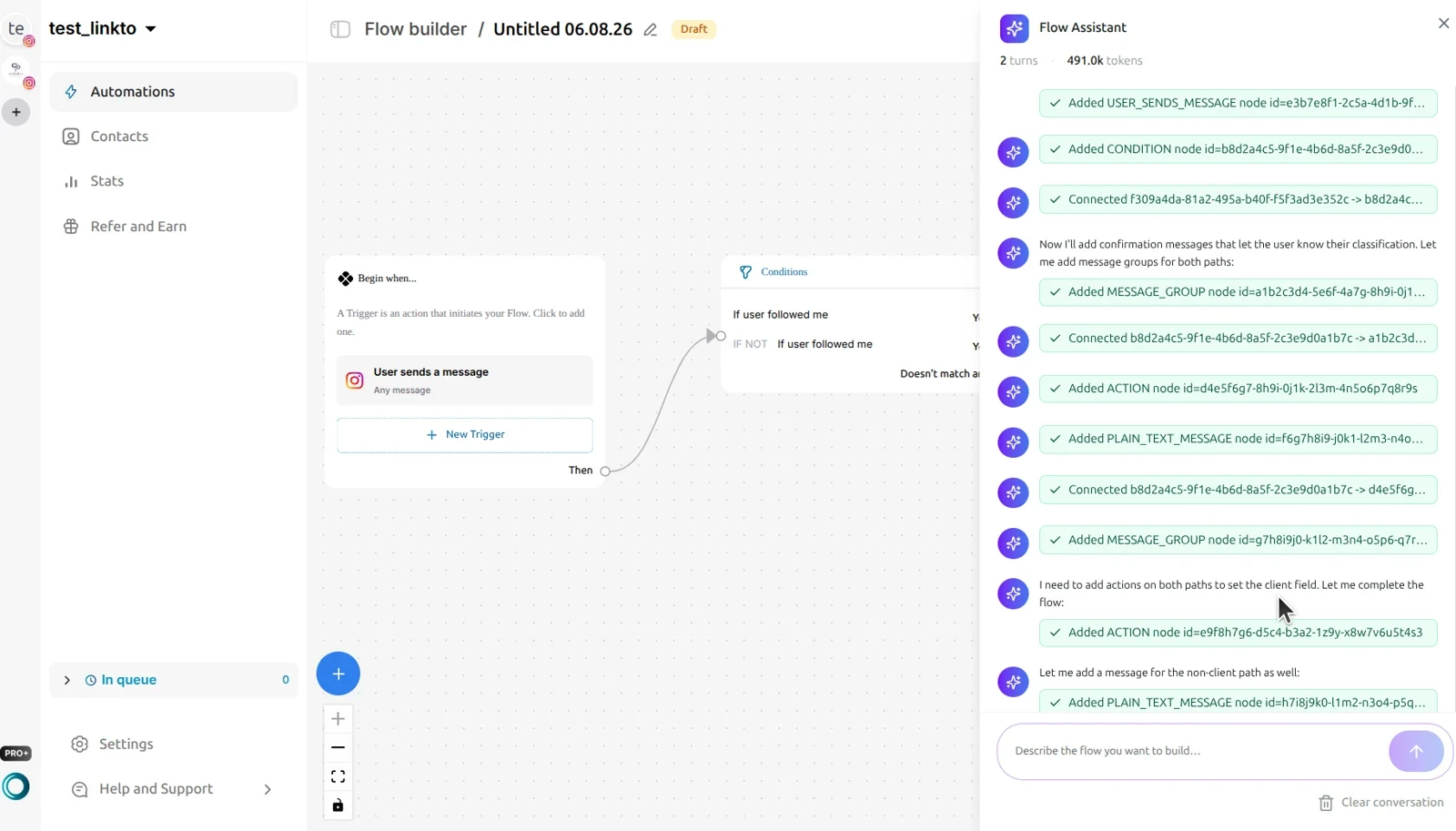
What it is: A visual, node-based builder for multi-step DM journeys — conditions, delays, random splits, payments and follow-ups based on what each person does.
Who it's for: Sellers with more than one offer, coaches qualifying leads, and anyone who needs more than "here's the link".
Outcome: Higher conversion through relevance — the right next message, not a longer first message.
How to set it up in LinktoDM
- Sketch the journey first: trigger → opener → branches → goal.
- Start from a flow template, or describe it and let the AI Flow Builder draft it.
- Add Conditions (followed you? email already saved?) and Delays for follow-ups.
- Take money in the chat with the Payment node, or A/B test messages with the Randomizer.
- Test every branch, then check flow analytics to see where people drop off.
For follow-up ideas, read how to revive Instagram conversations with automated follow-up DMs and how to book calls using DM automation.
Instagram DM Automation Types at a Glance
| If you need… | Start with | LinktoDM feature |
|---|---|---|
| Link delivery from posts and reels | 1. Comment-to-DM | Post automation |
| Replies to Story campaigns | 2. Story reply | Story automation |
| UGC and mention thank-yous | 3. Story mention | Story automation (mention) |
| FAQ triage and bio CTAs | 4. Keyword DM | Chat automation |
| Follower growth from lead magnets | 5. Ask to Follow | Ask to follow step |
| A list you own | 6. Email/phone capture | Collect info |
| Converting paid comments | 7. Boosted posts | Post automation + Smart Queue |
| Recovering a missed viral week | 8. Backtrack | Backtrack comments |
| Human-sounding public replies | 9. AI public replies | Public reply (AI) |
| Qualification, follow-ups, payments | 10. Flow Builder | Flow Builder |
Which Automation Types to Combine
Switching from ManyChat specifically? The migration guide covers rebuilding and disconnecting, step by step.
Best Practices Under Every Automation Type
- Use a tool on Meta's official API (no password sharing)
- Rotate message variations
- Deliver exactly what the caption promised
- Test from a second account before going live
- Run one automation app per Instagram account
- Identical blasts to hundreds of people
- Two live automations on the same post
- Asking for an email before giving anything
- Overlapping keywords that collide
- Reconnecting at random when something breaks
If an automation stops firing, start with the automation troubleshooting guide — and if you see an "another app is controlling conversations" error, here's the fix.
Frequently Asked Questions
What are the main types of Instagram DM automation?
How many automation types should I run at once?
Is Instagram DM automation allowed?
Do I need Flow Builder on day one?
Can I reply to Instagram comments I already missed?
Is LinktoDM the same as LinkDM?
Can I start Instagram DM automation for free?
Start With One Automation That Sells
You don't need all ten types this week. Pick the one your audience is already asking for — for most accounts, that's comment-to-DM — and ship it with variations and a clear CTA.
When you're ready for more, layer on Ask to Follow, email capture, Flow Builder and Backtrack. Each one is a small step, and each one turns more of the attention you already have into revenue.
Start free with LinktoDM, compare plans on pricing, or browse more guides on the LinktoDM blog.
Turn the next comment into a conversation.
Choose a clear trigger, write a useful response and try your first AP3K campaign.
SHARE THIS ARTICLE