Use AP3K templates to start a specific customer journey, then review the trigger, messages, links and optional steps before publishing. This guide explains how to select and test a template using the current AP3K gallery.
Choose the customer request first
A template is an editable starting point, not a finished campaign. Decide what the person asked for and what should happen next: a resource link, product details, a follow request or a contact-collection question. Choose the smallest template that serves that request.
Open New automation → Browse templates. Use the Basic and Flow filters or search for the job. Read the card’s trigger and paid-plan indicator. A Basic-category card can still open a Flow editor when the workflow needs several steps; category and execution type are not the same thing.
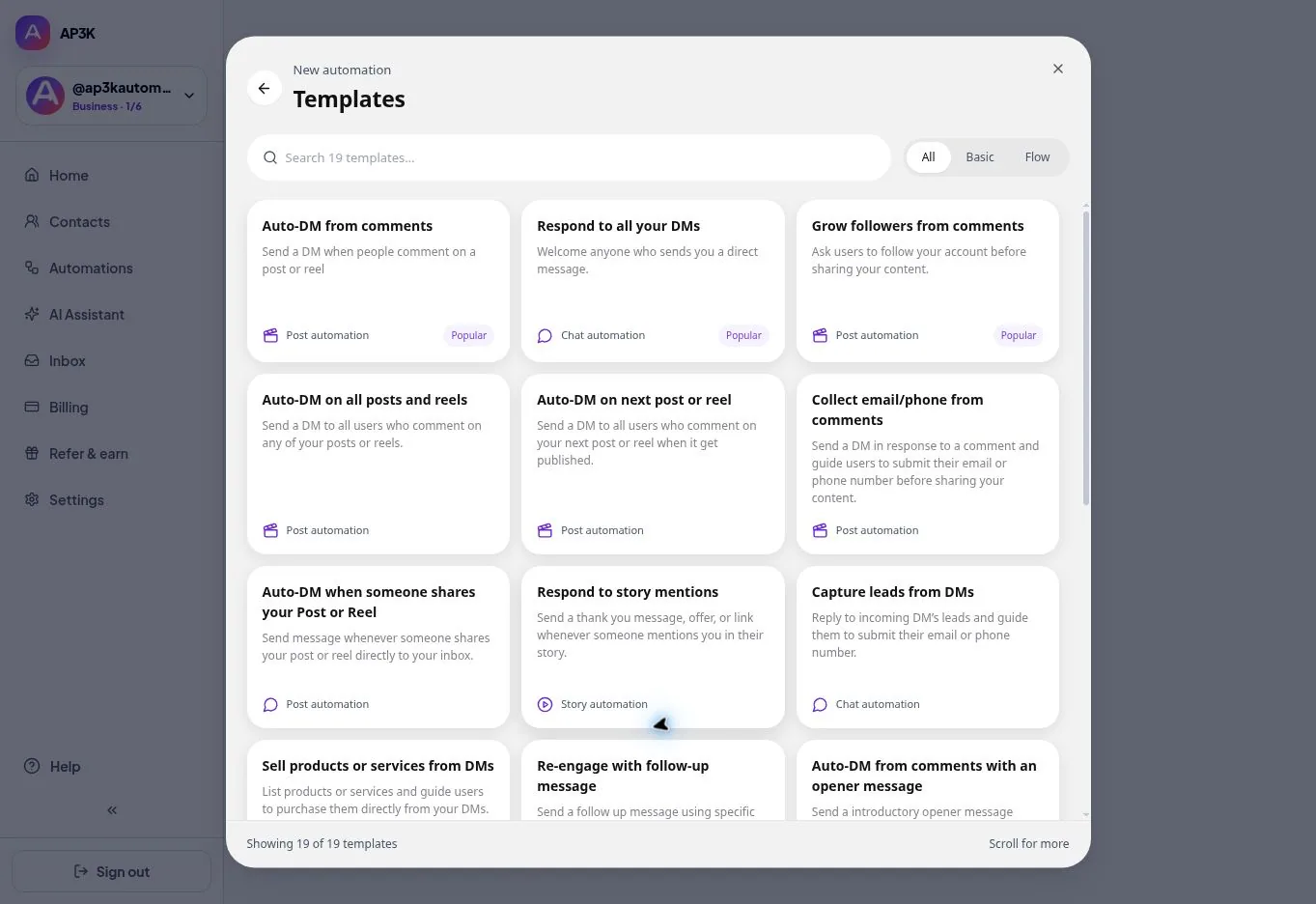
Match the template to the interaction
| Customer interaction | Starting template | What to verify |
|---|---|---|
| Comments a resource keyword | Auto-DM from comments | Selected media, keyword and final link |
| Needs a follow request before delivery | Grow followers from comments / Ask to follow | Opener, follow check and final message |
| Provides email or phone | Collect email/phone from comments | Question, valid response and saved contact |
| Sends an inbox message | Respond to all your DMs | Whether an any-message response is appropriate |
| Mentions your account in a story | Respond to story mentions | The actual mention event and response |
| Requests a guide with a later reminder | Deliver a guide and follow up | Collection, destination, condition and messaging eligibility |
The gallery may add or revise templates. Read the current card and the draft it creates instead of relying on a fixed template count. For your first test, a single post and one resource link are easier to diagnose than a broad account-wide campaign.
Replace every placeholder in the draft
- Account and media: confirm the selected Instagram username and the post, Reel, Story or inbox event. An all-posts or next-post scope needs its own deliberate review.
- Trigger: use the word promised in the caption. Any Comment is a different rule, not a repair for a keyword mismatch.
- Message: replace example copy and use the real resource or booking URL. Link-button labels support up to 20 characters; a regular DM message supports up to three link buttons.
- Extra steps: review the opener, follow gate, collection question, delay and follow-up condition. Remove unnecessary steps before launch.
- Plan and usage: check paid features and remaining monthly capacity. Unlimited active automations does not mean unlimited sending.
A template opens as a draft. Saving work does not publish it. Do not reuse example discounts, deadlines or business promises unless they are true for your offer.
Example: deliver a requested checklist
This is an illustrative setup, not a customer result. Caption: “Comment GUIDE for the checklist.” Trigger: the configured GUIDE keyword on the selected post. DM: “Here is the checklist you requested.” Button: “Get checklist,” pointing to your actual page.
Start with that direct path. If you need email collection, explain why you are asking and test that the value appears on the right contact before final delivery. If you add an opener, the person must complete the interaction. A phone preview is useful for wording and sequence but is not an Instagram delivery receipt.
قبل الترويج للحملة
- Review the advisory policy check and publish deliberately.
- From another Instagram account, create a fresh matching interaction and confirm the enabled public and private responses.
- Try a non-matching interaction for a keyword-only rule.
- Complete every optional step and open the real destination on a phone.
- Inspect sent, skipped or failed activity and the saved contact where relevant.
Follow-ups require eligible inbound interaction and an open allowed messaging window. A timer or template does not override Instagram rules. Duplicate protections can intentionally prevent repeated test sends.
If delivery fails, check the selected account, Live state, source, trigger, permissions and usage before replacing the template. Use the delivery troubleshooting guide.
Template questions
Can I edit a template? Yes. Review and customize the resulting draft for your business.
Does using a template publish it? No. Review the draft and explicitly publish when ready.
Are all templates free? No. Cards indicate paid requirements; collection, custom canvas publishing and other paid features require an eligible plan.
Does a successful preview guarantee delivery? No. Test the real interaction from a second account and check activity.