Writing four public replies by hand is fine. Writing enough of them that a busy post never repeats itself is not — which is where the الذكاء الاصطناعي tab comes in.
Instead of a list of replies, you give AP3K a prompt. Every comment that fires the automation gets its own reply, written on the spot from that prompt and the comment it’s answering.
Setting it up
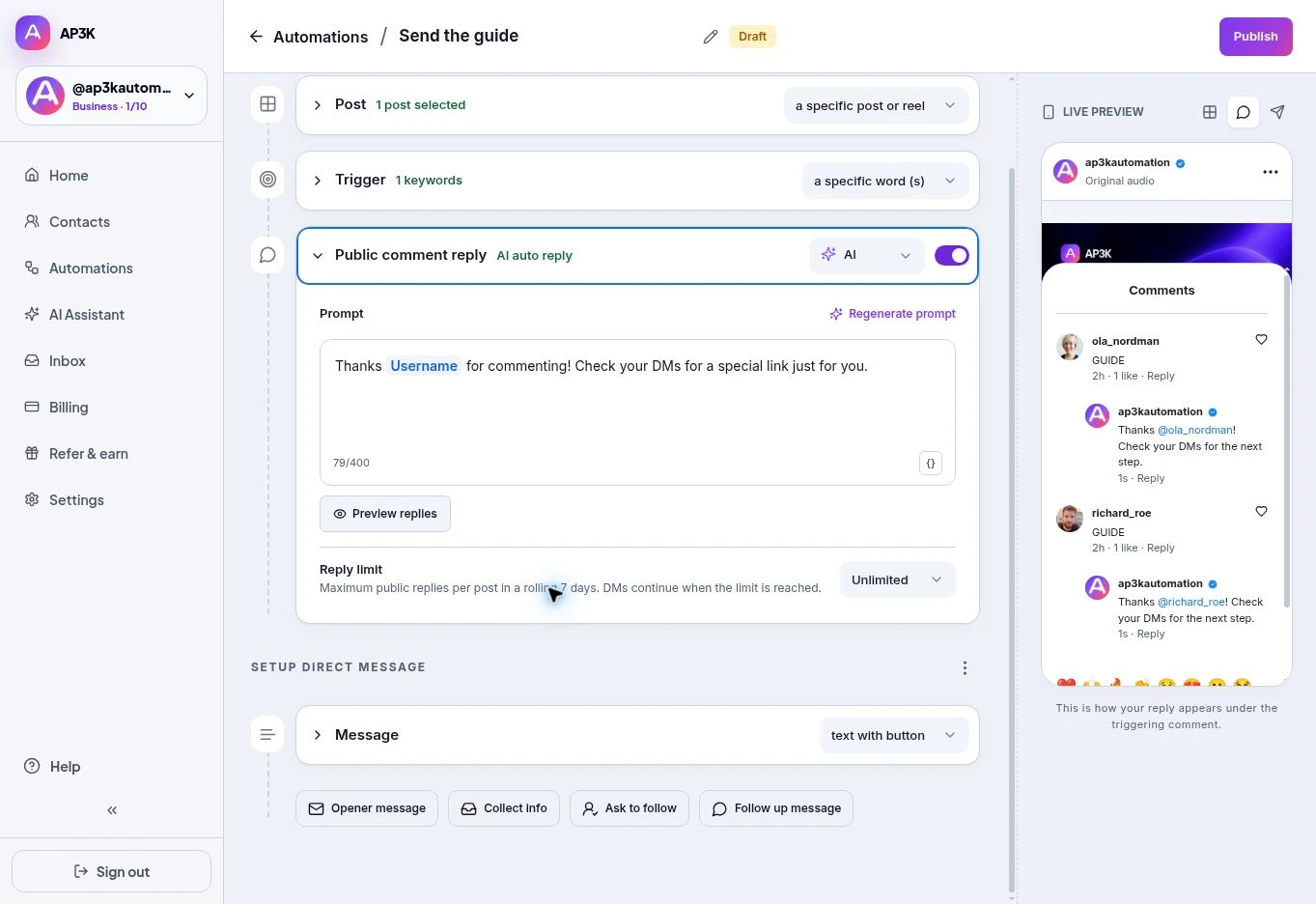
In the رد علني على التعليق card, switch the toggle on and pick الذكاء الاصطناعي — it’s the recommended tab.
Writing the prompt
The prompt is a description of what the reply should do and how it should sound, not the reply itself. The default is a good shape to copy:
Thank
{{username}}for commenting and let them know a special link is waiting in their DMs, with a friendly, cheerful tone.
Three things make a prompt work:
- The job. Point them to their DMs, thank them, answer the question — say which.
- The tone. “Friendly and cheerful”, “short and dry”, “warm, no emojis”. The AI will otherwise default to a brightness that may not be yours.
{{username}}where you want the commenter’s handle.
You have 400 characters, and the counter under the box tracks them.
إعادة إنشاء التعليمات rewrites the prompt itself — useful when you know roughly what you want but not how to phrase it. Show preview renders sample replies so you can hear the tone before anyone else does.
AI or manual?
Use الذكاء الاصطناعي when comment volume is high or unpredictable, when comments are actual questions rather than a keyword, or when you want the section to look genuinely conversational.
Use manual when the reply must be exact — a legal phrase, a promo code, a specific instruction — or when you’d rather approve every sentence your account posts in public.
The per-post cap in the card header applies here exactly as it does to manual replies: once it’s reached, public replies stop and DMs carry on.
Free previews and paid publishing
Free users can generate a prompt and sample replies within the preview allowance. This lets you review the tone before upgrading. When a Free account attempts to publish an automation with AI replies, AP3K shows الذكاء الاصطناعي متاح في الخطط المدفوعة فقط.
Choose Manual and review your saved replies if you want to publish without AI, or move to a paid plan. Published AI replies also depend on your plan’s AI allowance and the connected provider being available.